Material · Quality · Service

Follow every unit from the parts you buy to the service you provide.

MQS Tracker keeps your parts, bills of materials, inspections, orders and service history in one place, built for small manufacturers that build, sell and service their own equipment.

Runs in your browser. One plan with every feature, priced per user.

Unit

SN 24-1187

PA-200 pump assembly

In service
  1. Components from 3 vendors inspected

    Incoming inspection passed · 14 components

  2. Built to bill of materials

    Bill of materials PA-200 · costed rollup

  3. Final inspection: Pass

    Inspected against the unit’s serial number

  4. Sold on SLS-000124

    Tax calculated from the customer’s address

  5. Service order SVC-000311 completed

    2.5 h labor at the customer’s rate · 2 parts used

Illustration of a unit record in MQS Tracker
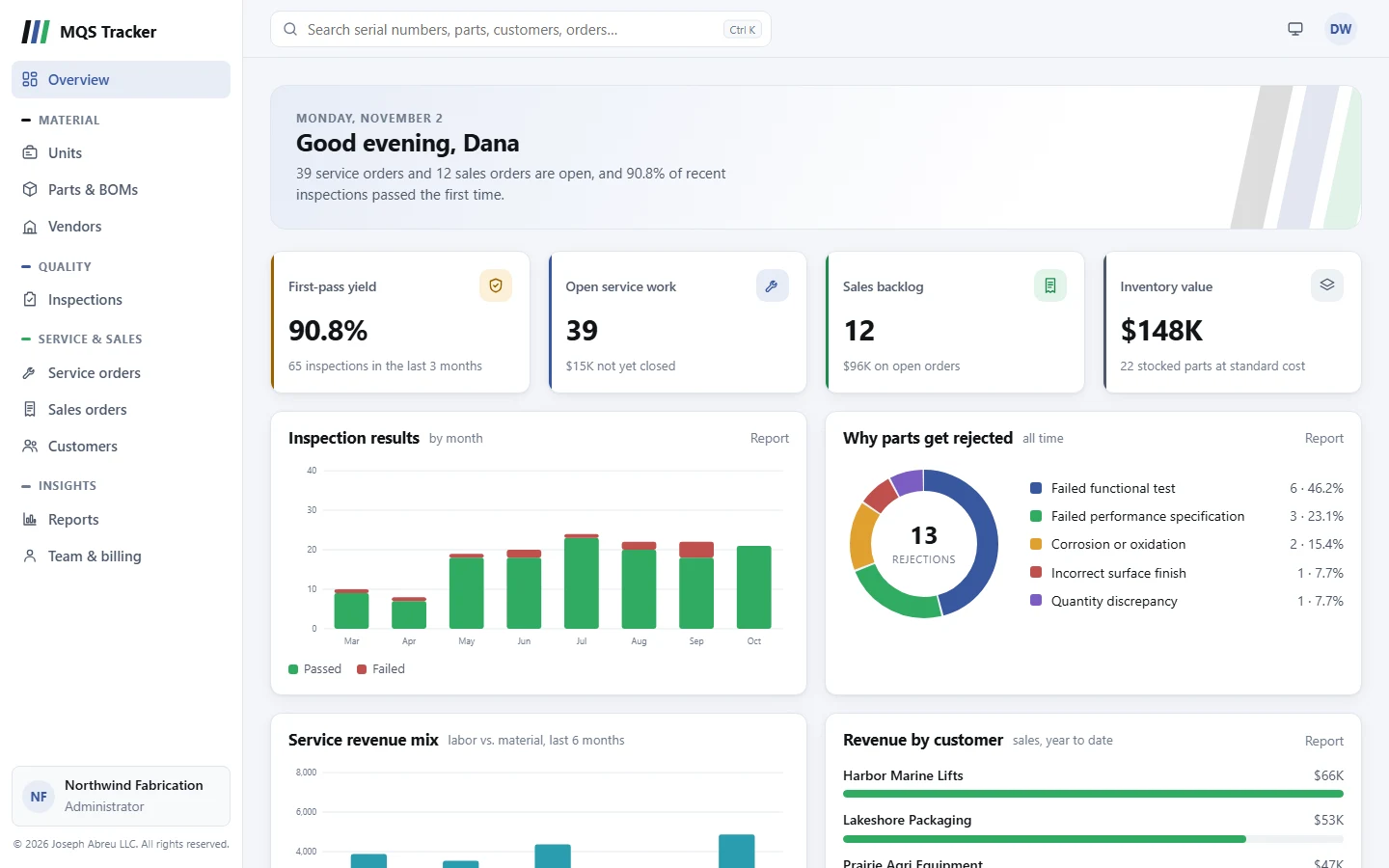
The MQS Tracker overview: first-pass yield, open service work, sales backlog and inventory value, with monthly inspection results and the reasons parts get rejected.

The overview: quality, open work and inventory at a glance. Screenshots use a fictional hydraulic power unit maker.

Three things every small manufacturer tracks, in one system.

MQS stands for Material, Quality, and Service. Instead of a parts spreadsheet, an inspection binder and a separate invoicing tool, each record links to the next, so you can answer “where did this come from?” and “what have we done to it since?” in one place.

Material

Parts, builds and inventory

Know what you stock, what it costs, and what you need to build next.

  • Parts with standard cost and price
  • Multi-level bills of materials with costed rollups
  • Serial-numbered units with full history
  • Vendors, and which parts each one supplies
  • Inventory counts, adjustments and shortages
Quality

Inspections and rejections

Record every check and see where problems come from.

  • Incoming, in-process, final, periodic and return inspections
  • Pass or fail, with notes required on every failure
  • Rejections with reasons and dispositions
  • Vendor quality scores and incoming yield
  • Pareto of nonconformances by defect and part

Service

Customers, orders and service

Sell what you build and keep servicing it afterwards.

  • Customers with contacts, addresses and terms
  • Sales orders from draft through invoiced
  • Service orders with labor and parts
  • Sales tax from the customer’s billing or shipping address
  • Print orders to hand or send to the customer
  • Installed base: every unit at every customer

How a unit moves through MQS Tracker

Each step builds on the one before, so the history is there when you need it, whether for a warranty question, a customer audit or a repeat order.

  1. Buy

    Add parts and the vendors that supply them, with standard costs.

  2. Inspect

    Inspect incoming parts and record rejections against the vendor.

  3. Build

    Assemble serial-numbered units from bills of materials.

  4. Sell

    Ship units and parts on sales orders, with tax and invoicing.

  5. Service

    Open service orders against installed units and bill labor and parts.

See it at work.

These are real screens from MQS Tracker, not mock-ups. Every record links to the ones around it, so one click takes you from a unit to its customer, its parts or its last service visit.

Material

The whole life of every unit

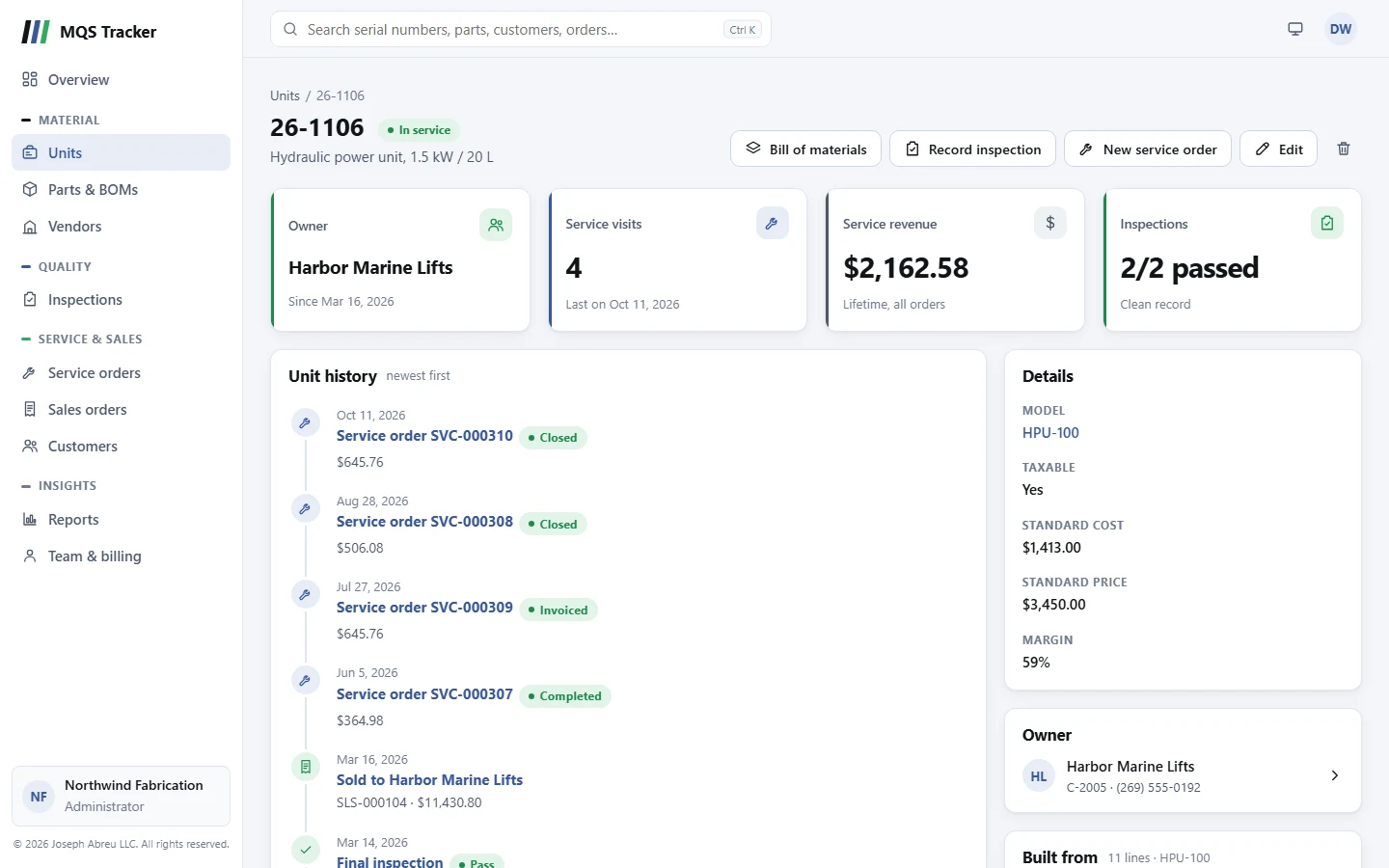
Open a serial number and see its story, newest first: the inspections it passed, when and to whom it was sold, and every service visit since, with what each one earned.

  • Current owner, set automatically when the sale ships
  • Service revenue and inspection record per unit
  • The bill of materials it was built from
A unit page for serial number 26-1106 showing its owner, four service visits, service revenue, passed inspections and a dated history from inspection through sale and service.

Material

Bills of materials, costed as you go

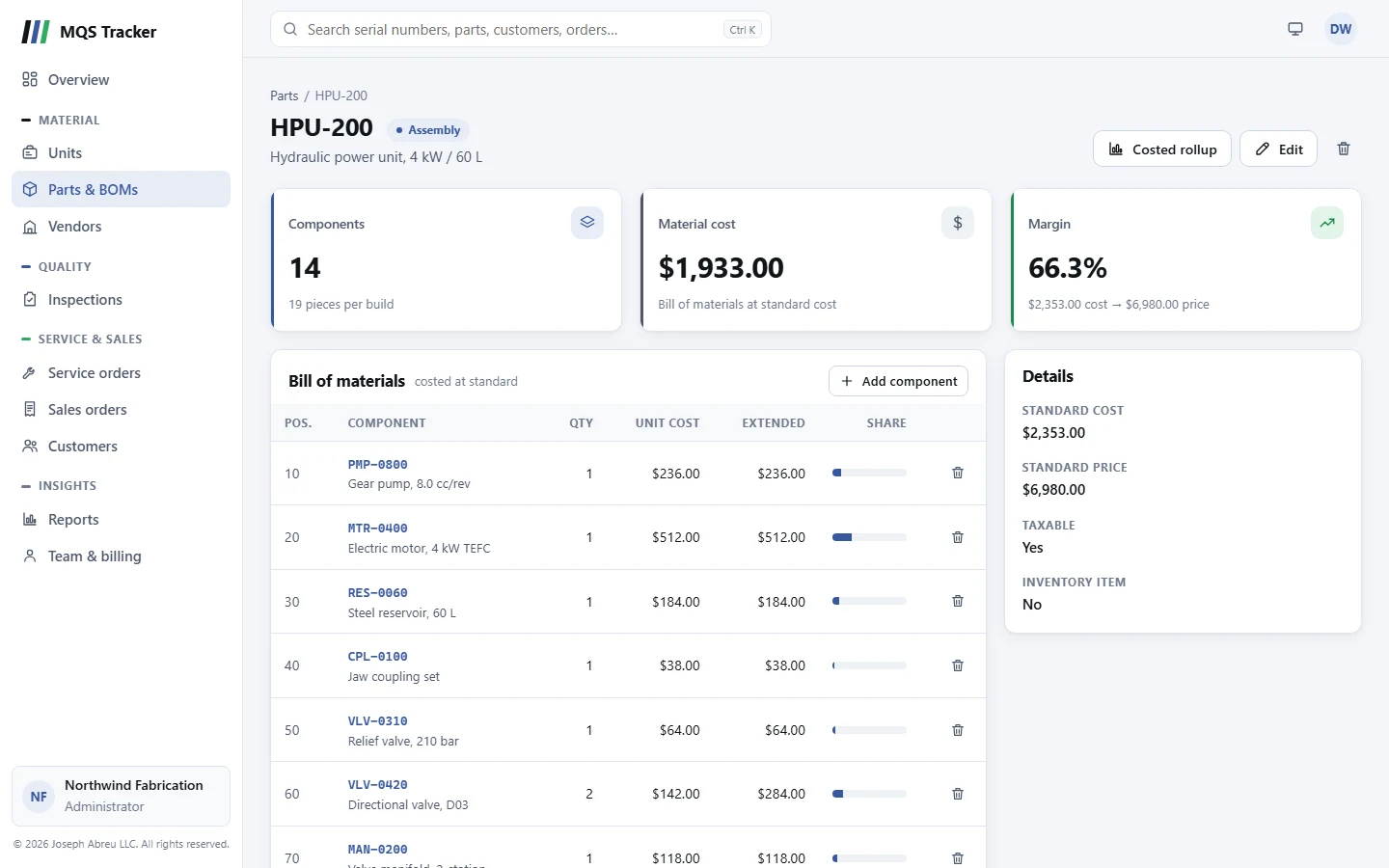
Build assemblies from your parts and see what each one costs to make, line by line, at your parts’ standard costs.

  • Material cost per build and margin at list price
  • Each component’s share of the cost
  • Where-used for any part, and a costed rollup report
The HPU-200 assembly with 14 components, a material cost of $1,933.00 and a 66.3% margin, and its bill of materials costed at standard.

Service

Service orders from open to closed

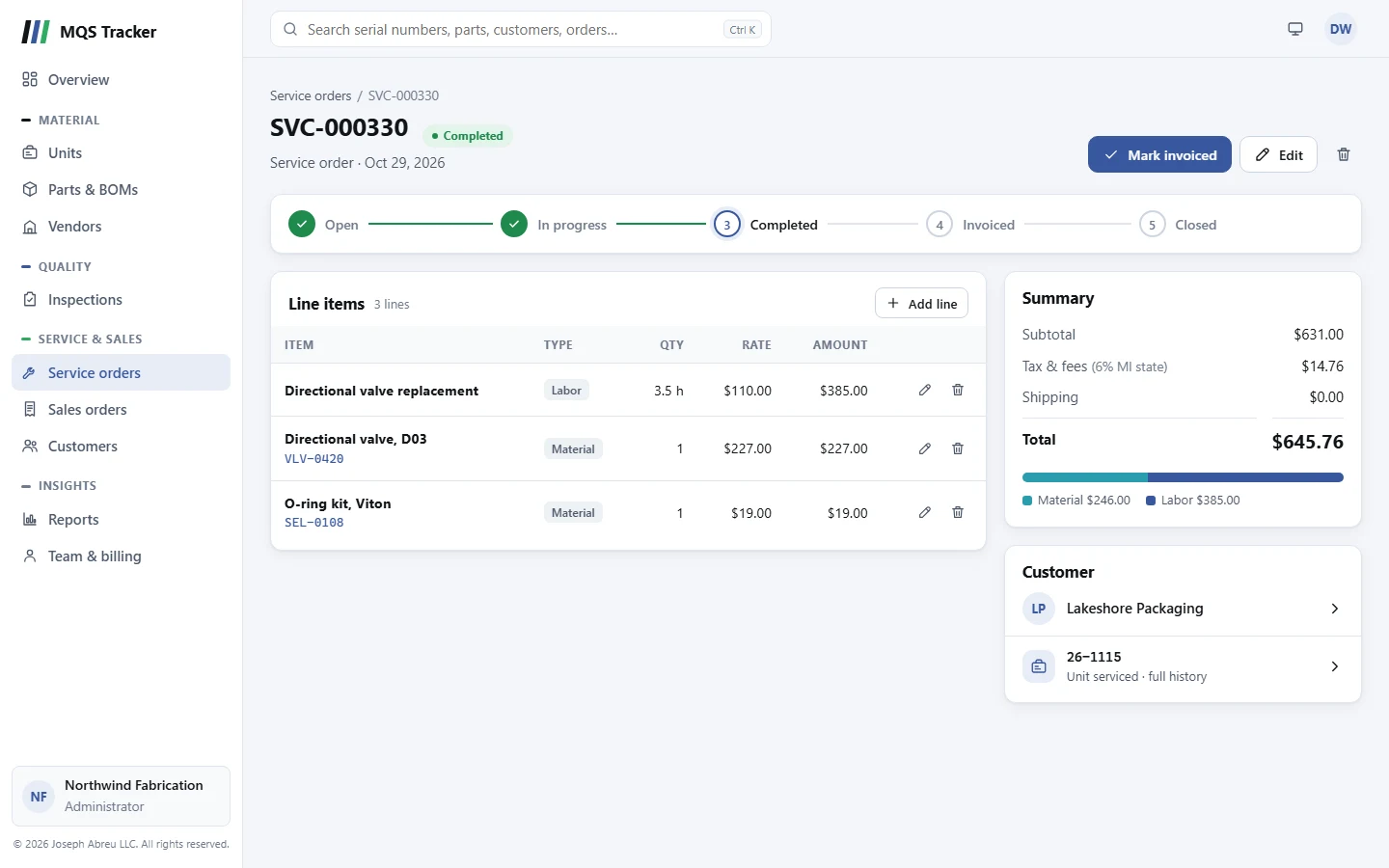
Log the labor and parts for each visit against the unit you serviced. Tax comes from the customer’s address, and one click moves the order to its next step.

  • Labor and material lines, with tax and totals worked out
  • Labor vs. material split on every order
  • Lines lock once an order is invoiced
Service order SVC-000330, completed, with a labor line and two parts, a summary with tax and total, and links to the customer and the unit serviced.

Quality

Reports that chart themselves

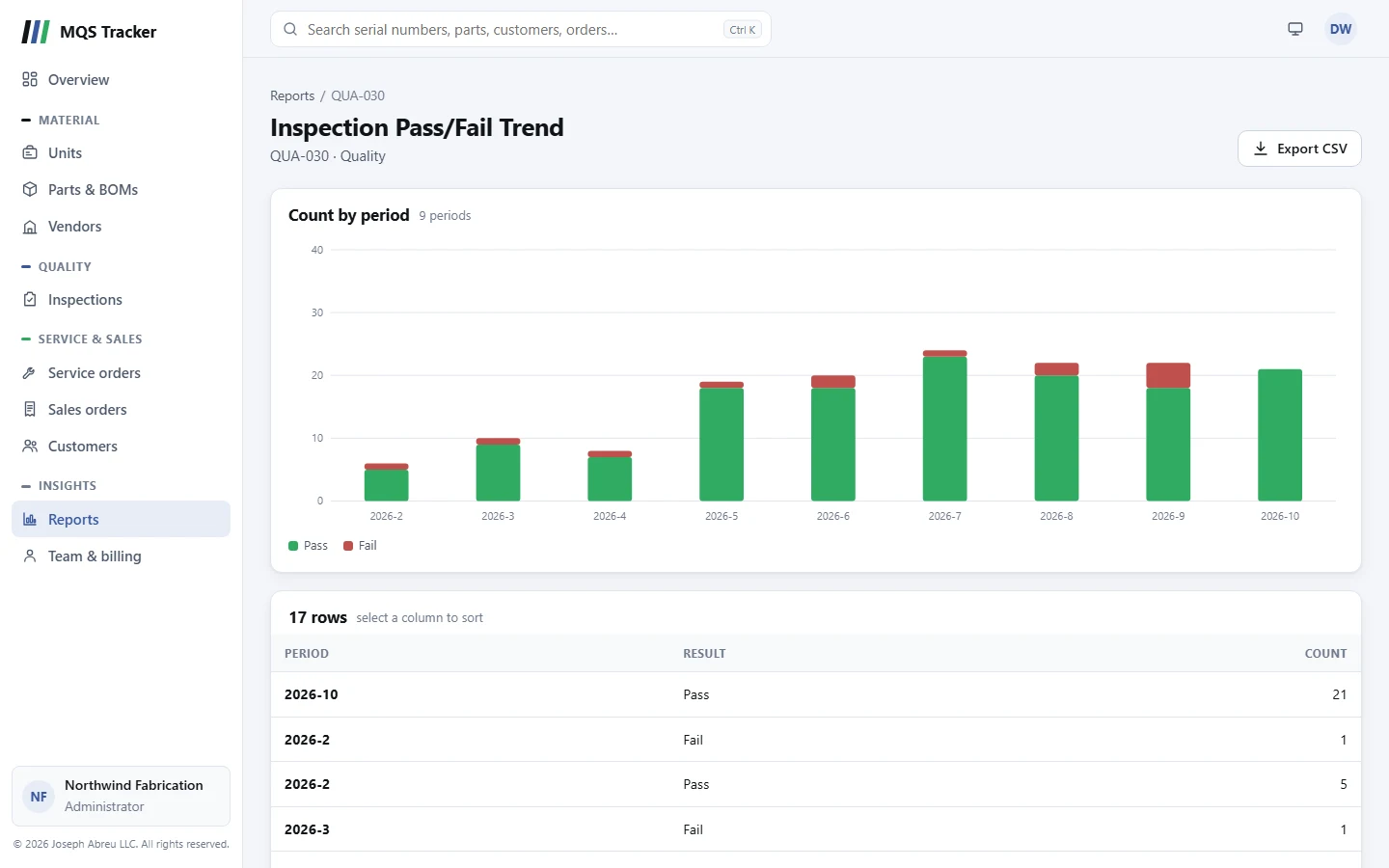
Pick a report and get a chart and a sortable table straight away, ready to read on screen or export to a spreadsheet.

  • Inspection pass/fail trend by month
  • Rejection reasons and vendor quality
  • Print any report, or export it to CSV
The Inspection Pass/Fail Trend report, charting passed and failed inspections for each month, above its table of results.

Anywhere

On the shop floor, too

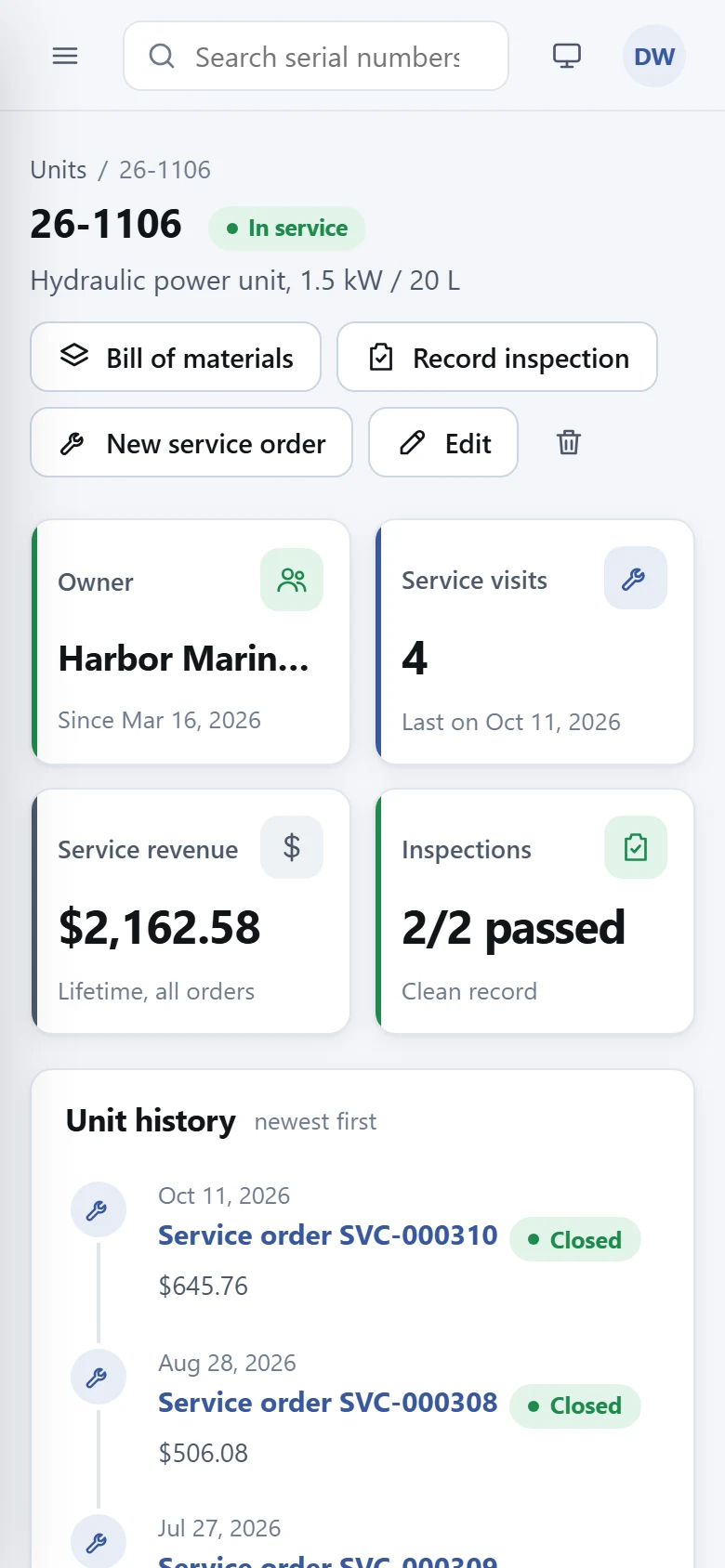
The same app works on a phone or tablet: look up a serial number at the bench, record an inspection, or check a unit’s history on a service call.

  • Search every serial number, part, customer and order
  • Nothing to install; it runs in the browser
  • Light and dark themes
The unit page for serial number 26-1106 on a phone, with its owner, service visits, revenue and history.

Over 40 reports, ready on day one.

No report builder to learn and nothing to export first. Pick a report, set its options, and print it or read it on screen.

Material 15 reports

  • Indented and costed bill of materials
  • BOM where-used
  • MRP component shortage
  • Inventory valuation and on-hand
  • Inventory turnover and days of supply
  • Single-sourced parts

Quality 12 reports

  • Vendor quality scores
  • Inspection pass/fail trend
  • Rejection reason breakdown
  • Nonconformance Pareto by defect
  • Chronic nonconformance by part
  • Serial number inspection history

Sales, service & finance 18 reports

  • Sales and service order backlog
  • Sales revenue by customer
  • Labor vs. material revenue mix
  • Technician productivity
  • Units never serviced
  • Tax collected and liability by jurisdiction
  • Sales commission by salesperson

A selection from each group. Every report is included in every subscription.

Built for a small team that shares the work.

Everyone works from the same records

Invite your team, choose who has administrator access, and remove someone’s access the moment they leave.

Your data stays separate

Each company’s records are kept in their own separate database space, apart from every other customer’s.

On the shop floor or in the office

MQS Tracker runs in a web browser on desktop, tablet or phone. There’s nothing to install.

One plan. Every feature.

No tiers and no add-ons. You pay for the people who use it.

MQS Tracker

Priced per user. Start with a one-month free trial.

Monthly $35 per user / month Cancel any time
Save 6% Annual $395 per user / year $32.92 per user a month, billed yearly
Start free trial

Prices exclude any applicable tax. Payments are handled securely by Paddle.

  • Material, quality and service modules
  • Over 40 built-in reports
  • Unlimited parts, units, customers and orders
  • Add or remove users as your team changes
  • Monthly or annual billing
  • Cancel or update payment details any time

Questions

What does MQS stand for?

Material, Quality, and Service: the three things MQS Tracker keeps in one place. Material covers parts, bills of materials, units and inventory; Quality covers inspections and rejections; Service covers customers, sales orders and service orders.

Who is MQS Tracker for?

Small manufacturers that build equipment from purchased parts, sell it, and keep servicing it afterwards. If you need to know which vendor’s parts went into a unit, whether it passed inspection, and what’s been done to it in the field, it’s built for you.

Is our data kept separate from other companies?

Yes. Each organization’s records are stored in their own separate database space, and every request is checked against your organization and your access before anything is returned.

How does the free trial work?

Sign up, choose monthly or annual billing, and start your free trial at checkout. Cancel before the trial ends and you won’t be charged. During the trial you can use every feature and invite your teammates, so your team can try it together.

How is pricing calculated?

By the number of users in your organization: $35 per user a month, or $395 per user a year. Prices exclude any applicable tax. When you add someone beyond your current number of seats, your subscription grows with you, and administrators can change the seat count from the Team & billing page.

How do I cancel or change my payment details?

An administrator can open the billing portal from the Team & billing page to update payment details or cancel. Billing is handled by our payment provider, Paddle.

Put your parts, quality and service records in one place.

Start a free trial and set up your first parts, units and customers today.